
Still Managing Attendance in Excel and WhatsApp? Build a More Reliable HR Process
Attendance becomes difficult when time records, leave explanations, permissions and manager approvals are scattered across Excel, WhatsApp and separate registers. Discover how Thirvu HR creates a more
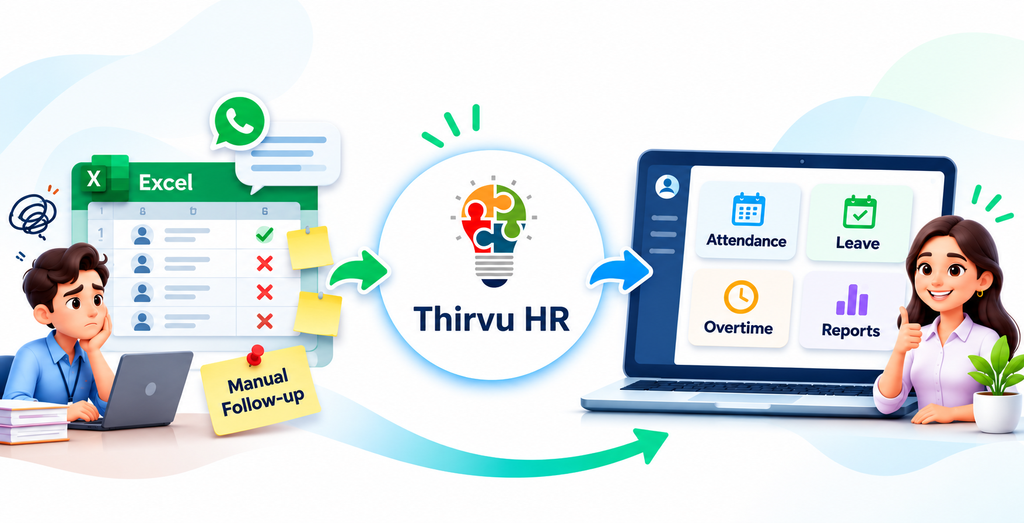
An attendance spreadsheet can tell you whether an employee is present, absent or late. A WhatsApp message may explain why. A manager may have approved a short permission verbally, while HR maintains overtime in another register.
When all these records are separate, attendance management becomes a manual reconciliation exercise.
This is where modern attendance management software can make a difference.
thirvu HR brings employee records, attendance, leave, permissions, overtime, compensatory off and HR reporting into a connected workflow. Instead of asking HR to compare multiple sources every month, the system provides a structured record that managers and HR teams can refer to.
For growing businesses, the objective is simple:
Record attendance → Capture exceptions → Get approvals → Review the complete HR history.
Why Excel and WhatsApp Become Difficult for Attendance Management
Excel is useful for many business tasks. WhatsApp is useful for communication. But neither is designed to become a complete employee attendance system.
As the workforce grows, HR teams commonly deal with:
- Attendance maintained in spreadsheets
- Leave requests received through WhatsApp
- Permission requests communicated verbally
- Overtime maintained in separate registers
- Comp-off tracked manually
- Attendance corrections handled through messages
- Managers asking HR for employee attendance history
- Month-end payroll preparation requiring multiple checks
The problem is not that every individual record is incorrect.
The problem is that the information is distributed across different places.
HR then becomes the person responsible for connecting all those records.
A structured HR attendance software solution can bring these activities into a common employee-based workflow.
What Should an Employee Attendance System Actually Track?
Attendance is more than marking an employee as present or absent.
A practical employee attendance system should help HR understand:
- Who is the employee?
- Which department or branch do they belong to?
- When did they check in?
- When did they check out?
- Where was the attendance marked?
- Was the employee on approved leave?
- Was there an approved permission?
- Was overtime recorded?
- Was compensatory off earned?
- What information should managers review?
When these questions can be answered from connected records, attendance review becomes much easier.
Start With a Reliable Employee Database
A good attendance management system starts with a reliable employee master.
thirvu HR provides a centralized employee record where organizations can maintain relevant information such as:
- Employee ID
- Employee name
- Department
- Designation
- Branch
- Reporting structure
- Contact information
- Other configured employee details
Attendance, leave and other HR activities can then refer to the same employee record.
This avoids maintaining different versions of an employee's information across multiple spreadsheets.
For businesses with multiple branches, this also creates a more organized employee directory that can support branch-wise HR administration.
Geofencing Attendance for Location-Based Verification
For businesses where employees are expected to mark attendance from specific locations, a timestamp alone may not provide enough context.
thirvu HR supports geofencing attendance, allowing approved workplace zones to be configured for offices, branches, sites or other permitted locations.
The process can include:
- Define the approved workplace location.
- Configure the relevant employee or work location.
- Employee checks in or checks out using the configured attendance method.
- Device location can be compared with the approved work zone.
- HR can review the attendance record with additional location context.
This makes thirvu HR useful for organizations looking for location-based attendance software and modern employee attendance tracking.
Important limitation
Geofencing helps provide additional confidence about where attendance was marked. It does not prove that an employee performed work.
Location accuracy can depend on:
- GPS availability
- Device permissions
- Network conditions
- Device settings
- Configured geofencing rules
Therefore, organizations should define their attendance policy clearly before implementation.
Keep Leave and Permission Management Separate
Leave and permission are not always the same thing.
An employee taking several days off requires a leave request. An employee arriving late or leaving early may require a short permission.
When both are handled through WhatsApp messages or verbal communication, HR may struggle to determine what actually happened.
thirvu HR provides structured leave and permission management so employees can submit the appropriate request and designated managers can review it.
This creates a clearer history of:
- Leave requests
- Permission requests
- Approval status
- Employee details
- Relevant dates
- Attendance-related exceptions
Instead of searching through old messages, HR can refer to the corresponding system record.
Record Overtime and Comp-Off Properly
Overtime is another area where manual records can create confusion.
An employee may work additional hours, but HR still needs to know:
- On which date?
- For which employee?
- How much additional time?
- Was it approved?
- Does it qualify under company policy?
- Does it result in compensatory off?
thirvu HR supports structured overtime and comp-off records so these activities can be maintained as part of the employee's HR history.
Compensatory off can be recorded for eligible work performed on approved weekly offs or holidays, based on the organization's policy.
The exact overtime calculation, approval rules and comp-off policy can be configured according to business requirements during implementation.
What HR Gains From a Connected Attendance Process
Moving from scattered attendance records to a connected HR attendance management system can provide several practical benefits.
Fewer sources to check
HR does not have to continuously compare Excel files, WhatsApp messages and separate registers.
Clearer attendance history
Attendance, leave and permission records can be reviewed together with the employee record.
Better manager visibility
Managers can review relevant employee requests and attendance information through the configured workflow.
More consistent exception handling
Leave, permission, overtime and comp-off can follow defined processes instead of depending on informal communication.
Easier HR reporting
HR can use organized system records rather than manually preparing summaries from different sources.
The objective is not to make attendance more complicated.
The objective is to make attendance easier to understand.
A Practical Attendance Management Workflow
A structured attendance process can follow this simple flow:
Employee Details
↓
Attendance
↓
Leave / Permission
↓
Manager Approval
↓
Overtime / Comp-Off
↓
Attendance Review
↓
HR Reports
This creates a common employee history instead of maintaining disconnected records.
thirvu HR for Growing Businesses
As organizations grow, HR processes often expand faster than their spreadsheets.
A business may begin with a simple attendance sheet. Later, it needs:
- Multiple branches
- Different work locations
- Leave approval
- Permission management
- Overtime tracking
- Comp-off management
- Employee reports
- Location-based attendance
- Biometric integration
- Field employee tracking
At that stage, continuing with multiple disconnected files can increase administrative effort.
thirvu HR provides a structured foundation for organizations looking for HRMS software for growing businesses.
Additional capabilities can also be considered based on business requirements, including:
- Biometric attendance integration
- Live employee location
- Field visit management
- Employee expense management
- Employee task management
- Email notifications
- Advanced HR reports and analytics
This allows businesses to adopt additional HR capabilities as their requirements grow.
How thirvu HR Fits Into Your Wider Business Software
HR is only one part of a growing business.
Organizations may also require ERP for finance, inventory, sales, purchasing and operations, along with CRM for customer and sales management.
Thirvusoft works with businesses evaluating solutions such as ERPNext in Coimbatore and ERPNext in Tamil Nadu, along with broader ERP in Coimbatore and ERP in Tamil Nadu requirements.
For organizations searching for CRM in Coimbatore or CRM in Tamil Nadu, the right approach may involve connecting customer-facing operations with internal employee workflows.
The important point is to avoid selecting software based only on individual features.
The system should fit the organization's complete business process.
Attendance Management Beyond Payroll
Attendance information is often treated only as a payroll input.
But it can provide much more operational value.
A well-organized attendance system can help HR understand:
- Employee availability
- Attendance patterns
- Leave activity
- Permission usage
- Overtime activity
- Comp-off utilization
- Branch-wise employee activity
- Attendance exceptions
This makes attendance management part of broader employee management software, rather than simply another spreadsheet maintained before payroll.
Frequently Asked Questions
Can thirvu HR replace an Excel attendance tracker?
Yes. thirvu HR provides a structured employee and attendance environment with related leave, permission, overtime and comp-off records. The exact workflow should be configured according to the organization's attendance policy.
Does thirvu HR support geofencing attendance?
Yes. Geofencing-based attendance can use device location to help verify whether attendance was marked within a configured workplace zone.
Can leave and permission be managed separately?
Yes. Leave and permission can be maintained as separate HR processes, allowing organizations to distinguish full-day or planned absence from shorter attendance exceptions.
Does thirvu HR support overtime?
Yes. Overtime can be recorded and reviewed according to the organization's configured policies. Specific calculation and approval rules should be defined during implementation.
Can thirvu HR manage compensatory off?
Yes. Comp-off can be maintained for eligible work performed according to the organization's policy, with earned and utilized records managed where configured.
Is thirvu HR suitable for multiple branches?
Yes. Employee and attendance information can be organized across configured branches and work locations according to the organization's requirements.
Can biometric attendance be integrated?
Biometric attendance integration can be provided as an optional capability. Device compatibility, synchronization requirements and attendance event mapping should be confirmed during implementation.
Ready to Move Beyond Excel and WhatsApp?
If your HR team spends too much time checking spreadsheets, searching WhatsApp messages and reconciling separate attendance registers, it may be time to move to a structured attendance management software solution.
thirvu HR provides a practical way to connect:
Employee → Attendance → Leave → Permission → Overtime → Comp-Off → Reports
For businesses evaluating ERPNext in Coimbatore, ERPNext in Tamil Nadu, ERP in Coimbatore, ERP in Tamil Nadu, CRM in Coimbatore or CRM in Tamil Nadu, Thirvusoft can also help evaluate how HR fits into the wider digital business environment.
Book a thirvu HR demo to review your attendance rules, work locations, leave process, permission workflow and HR reporting requirements.
Product Note
Feature availability, approval workflows, device compatibility, location behavior, integrations and report scope should be confirmed during product demonstration and implementation scoping. Optional modules are enabled according to agreed requirements.
📞 Book Your FREE ERPNext Demo Today
Call / WhatsApp: +91 63790 44767
📍 Peelamedu, Coimbatore
No comments yet. Login to start a new discussion Start a new discussion