
Where Did Your Field Staff Actually Go Today? Building GPS Route Tracking Into ERPNext Attendance
Track field staff check-ins, routes, customer visits, leads, distance and working hours with GPS route tracking connected to ERPNext Attendance.
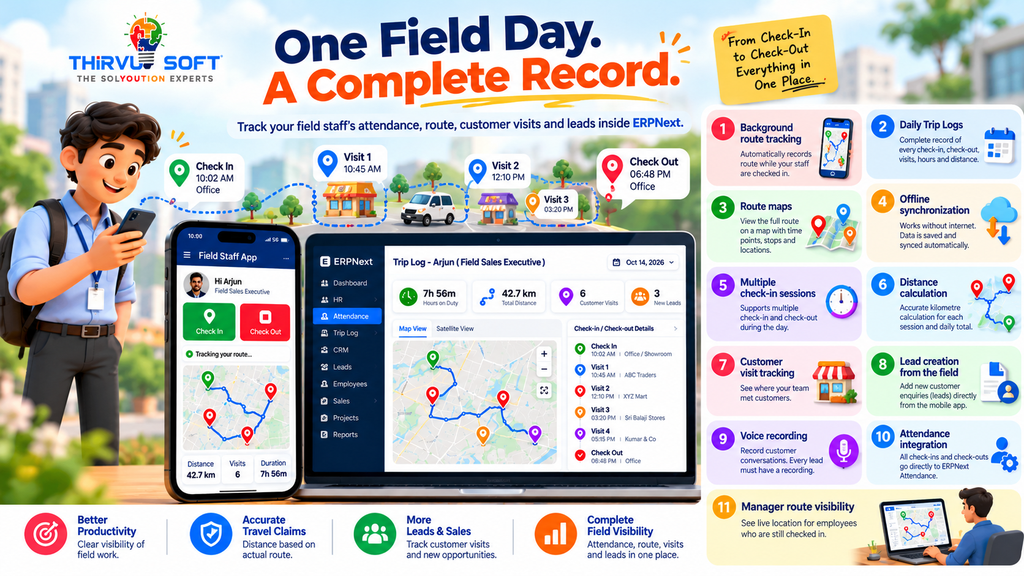
A sales executive checks in at 10:00 AM and checks out at 7:00 PM.
The attendance register shows nine hours worked.
But where were those nine hours spent?
For businesses with field sales teams, service employees or customer-facing staff, ERPNext attendance can tell you when an employee started and ended the working day. But attendance alone does not tell you where the employee travelled, which customers were visited or how much distance was covered.
A manager may still need to ask:
- Where did the employee check in?
- Which route did they travel?
- How many kilometres did they cover?
- Which customers did they visit?
- How long were they on duty?
- Which new customers did they meet?
- Where did they check out?
- Does the travel claim match the actual distance travelled?
This is where GPS route tracking in ERPNext becomes valuable.
Instead of maintaining separate attendance sheets, travel claims and customer visit records, businesses can connect field activity with ERPNext Attendance and maintain a complete record of the working day.
For companies evaluating ERPNext in Coimbatore or looking for a practical ERP in Coimbatore, this type of field-work integration can connect attendance with real operational activity.
Attendance Tells You When. GPS Route Tracking Tells You Where.
A check-in and check-out provide two important pieces of information:
Start time + End time = Attendance
But field employees do much more between those two points.
They travel to customers, meet prospects, follow up on enquiries, collect orders and visit different locations.
That activity is not visible in a traditional attendance record.
With employee GPS tracking connected to ERPNext, the working day can be viewed as:
Check In → Route → Customer Visits → Leads → Check Out
This gives managers a clearer picture of the employee's actual field activity.
For organizations implementing ERP in Tamil Nadu, connecting attendance and field activity can reduce dependence on separate registers and manually prepared travel reports.
Start With Where the Employee Actually Checked In
Many field attendance problems begin at the first step.
An employee may check in from home, while travelling or from another location. A basic attendance register may still show the entry as a normal check-in.
With a customized ERPNext field staff tracking app, the employee can tap Check In on the mobile application.
The application records the employee's current location and creates the check-in entry in ERPNext Attendance.
Several controls make the process reliable:
- The check-in time comes from ERPNext rather than the phone's clock.
- The employee's GPS location is captured at the time of check-in.
- Each employee signs in using their own mobile number.
- The check-in requires an internet connection so that it can be confirmed immediately.
This creates a stronger connection between GPS employee attendance and the employee's actual location.
For businesses searching for ERPNext in Coimbatore, this is an example of how ERPNext can be extended around an organization's actual field-work process rather than forcing employees to maintain additional manual records.
Attendance Is Not the Same as Field Activity
A check-in and check-out tell you that an employee was on duty.
They do not explain what happened during those hours.
For field staff, the activity between check-in and check-out is often the most important part of the working day.
Without field staff tracking, a manager may need to ask the employee:
“Which customers did you visit today?”
With GPS route tracking in ERPNext, the manager can review the recorded route and connected customer activities.
The objective is not simply to collect more data.
The objective is to connect:
Attendance + Travel + Customer Visits + Leads
into one working-day record.
Record the Route Between Check-In and Check-Out
Once an employee checks in, the mobile application records the route in the background.
The employee does not need to repeatedly open the application during the day.
The route continues to be recorded while the employee is working, including when the phone is locked or the application is closed.
A notification informs the employee that route recording is active.
The process is simple:
- Employee checks in.
- GPS route tracking starts.
- The route is recorded while the employee is checked in.
- Stops are recorded when the employee remains at a location.
- Weak or inaccurate location readings are ignored.
- Tracking stops when the employee checks out.
Nothing is recorded after the employee checks out.
This makes GPS route tracking in ERPNext suitable for organizations that want field activity connected to attendance without requiring employees to manually update their location throughout the day.
Poor Network Should Not Destroy Field Data
Field employees do not always have a reliable internet connection.
They may travel through:
- Rural areas
- Highways
- Basements
- Buildings with poor reception
- Areas with temporary network interruptions
A field tracking application that depends entirely on a continuous internet connection can lose important information.
The solution is offline data handling.
The route can be stored on the employee's phone first and synchronized with ERPNext when connectivity becomes available.
The workflow can handle situations such as:
- Route data being recorded without continuous internet.
- Data being synchronized automatically when connectivity returns.
- Check-out being saved locally when there is no signal.
- Correct original timestamps being retained.
- Duplicate records being avoided when data is synchronized later.
- ERPNext being temporarily unavailable without immediately losing field information.
For businesses considering ERPNext in Tamil Nadu, offline capability can be an important requirement when employees regularly work outside strong network areas.
One Employee, One Daily Trip Log
A field employee's day is not always one continuous trip.
For example:
10:02 AM – Check In
↓
Customer visits
↓
1:15 PM – Check Out
↓
Lunch break
↓
2:05 PM – Check In
↓
More customer visits
↓
6:48 PM – Check Out
Instead of treating the entire day as one continuous route, a Trip Log in ERPNext can maintain each check-in session separately.
A daily Trip Log can contain:
- Check-in time
- Check-out time
- Check-in location
- Check-out location
- Route travelled
- Distance travelled
- Hours on duty
- Customer visits
- New leads created
- Daily kilometre total
Break periods are not treated as active travel time.
This gives management a cleaner picture of the actual field day.
Measure Distance Instead of Relying on Travel Claims
Travel claims can become difficult to verify when distance is entered manually.
For example, an employee may submit a claim for:
60 km
while the recorded route shows:
42.7 km
Instead of relying on assumptions, the manager can review the actual Trip Log.
For example:
| Field ActivityCheck InCheck OutHoursDistance | ||||
| Showroom to customer visits | 10:02 AM | 1:15 PM | 3h 13m | 18.6 km |
| Afternoon follow-up visits | 2:05 PM | 6:48 PM | 4h 43m | 24.1 km |
| Day Total | 10:02 AM | 6:48 PM | 7h 56m | 42.7 km |
The purpose is not to create suspicion.
It is to create a reliable reference for employee travel, attendance and field activity.
This makes field sales tracking more transparent for both employees and management.
What Does a Verified Field Day Mean?
A verified field day connects the complete working-day record:
Where They Checked In
↓
Route Travelled
↓
Customers Visited
↓
Leads Created
↓
Where They Checked Out
↓
Total Hours & Distance
Traditional attendance answers:
“Was the employee on duty?”
A connected field tracking system can help answer:
“What happened during the working day?”
This is one of the key benefits of connecting mobile attendance ERPNext with GPS route tracking.
See the Employee Route on a Map
Numbers are useful.
Maps make the information easier to understand.
A Trip Log can display the employee's route on a map, including:
- Check-in location
- Check-out location
- Route travelled
- Time at route points
- Customer visit locations
- Last-seen location for employees still checked in
- Separate routes for different check-in sessions
- Street and satellite views
- Full-screen map view
For employees who are still checked in, the route information can update periodically while the manager is viewing the map.
A manager can therefore open the employee's Trip Log and understand the day's movement without repeatedly calling the employee.
This is where an ERPNext customization can bridge the gap between standard attendance and real field operations.
Connect Attendance With Field Work
The mobile application should not become another isolated system.
The objective is to connect it with ERPNext.
The workflow can be:
Employee Checks In
↓
Location Saved in ERPNext Attendance
↓
Daily Trip Log Starts
↓
GPS Route Recorded
↓
Customer Visits Recorded
↓
New Leads Added
↓
Employee Checks Out
↓
ERPNext Attendance Continues Using Existing Rules
This approach keeps ERPNext Attendance as the core attendance record while the mobile application captures the additional field information.
That is particularly useful for organizations looking for ERP in Coimbatore or ERPNext in Coimbatore implementation with customized field operations.
Where Does CRM Fit Into Field Staff Tracking?
GPS tells you where the employee went.
CRM tells you what came out of the visit.
A field salesperson may visit several potential customers during the day.
During those visits, the employee can create a new lead from the same mobile application.
The lead can be linked to the employee's Trip Log so management can understand the relationship between:
Customer Visit → Lead → Conversation → Field Day
The workflow can include:
- Lead creation from the mobile application.
- Customer name and mobile number as required fields.
- Additional customer information where required.
- Lead linked to the employee's Trip Log.
- Voice recording of the customer conversation.
- Recording stored privately with the lead.
- Lead creation protected against duplicate submission during network interruptions.
This creates a useful connection between CRM in Coimbatore and field activity.
For organizations looking for CRM in Tamil Nadu, integrating CRM with attendance and field tracking can provide a more complete picture of customer acquisition activity.
ERP and CRM Should Work Together
Imagine a field employee's day.
They check in at the showroom.
The location is recorded.
They travel to a customer location.
The route appears in the Trip Log.
They meet a potential customer.
A new lead is created.
The customer conversation is recorded.
The employee moves to the next visit.
At the end of the day, they check out.
Now the business has one connected record containing:
Attendance + Route + Visits + Leads + Distance + Working Hours
This is much stronger than maintaining separate attendance registers, travel claims and CRM spreadsheets.
For companies evaluating ERPNext in Tamil Nadu, this kind of integration can make the ERP more useful to sales managers, HR teams and management.
Likewise, businesses searching for CRM in Tamil Nadu can connect customer activity directly to the field team's working day.
Why ERPNext Customization Matters
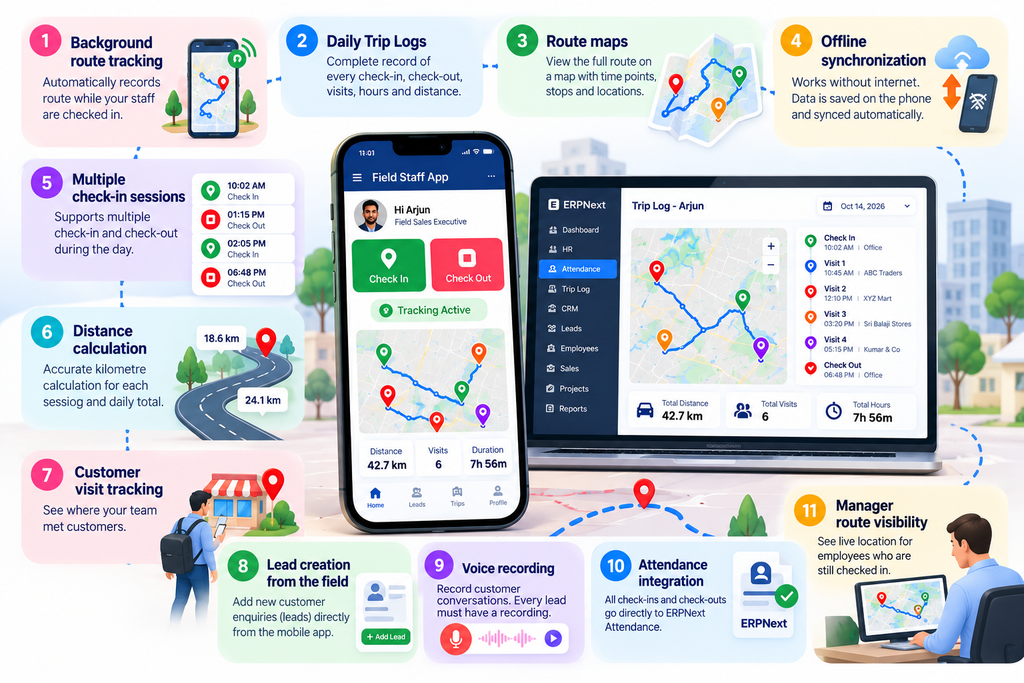
Standard ERPNext can already capture a location with an attendance check-in.
But a business may need much more.
For example:
- Background route tracking
- Daily Trip Logs
- Route maps
- Offline synchronization
- Multiple check-in sessions
- Distance calculation
- Customer visit tracking
- Lead creation from the field
- Voice recording
- Attendance integration
- Manager route visibility
These requirements may need ERPNext customization and a dedicated mobile application.
For an ERPNext implementation in Coimbatore, the important question should not simply be:
“Does ERPNext have attendance?”
The better question is:
“Can ERPNext be connected to the way our field team actually works?”
With appropriate customization, the answer can be yes.
Management Needs Exceptions, Not More Spreadsheets
Managers do not necessarily need to study every employee's route every day.
They need to identify the days that require attention.
A connected field staff tracking app can help answer questions such as:
- Who checked in from an unexpected location?
- Who was on duty for several hours but covered very little distance?
- Whose travel claim differs significantly from the recorded distance?
- Who completed a full field day without adding any leads?
- Which employees generated the most new leads?
- Who is still checked in after expected working hours?
- Which customer areas are being visited regularly?
- Which areas are receiving very little field coverage?
The purpose of the dashboard is therefore not to create another spreadsheet.
It is to highlight exceptions that require management attention.
What a Connected GPS Field Tracking Workflow Looks Like
1. Employee Signs In
The employee opens the mobile application and signs in using their registered mobile number and password.
2. Check In
The employee taps Check In.
ERPNext records the attendance time and location.
3. Trip Log Starts
The employee's daily Trip Log begins.
4. GPS Route Tracking Starts
The application records the employee's route in the background while they remain checked in.
5. Location Data Is Validated
Weak or inaccurate location readings are excluded so the route remains more meaningful.
6. Data Synchronizes With ERPNext
Route information is synchronized whenever connectivity is available.
7. Customer Visits Are Recorded
The employee can add new leads while visiting customers.
8. Customer Conversation Is Recorded
The required voice recording is attached to the corresponding lead.
9. Check Out
The employee taps Check Out.
Route tracking stops.
10. Hours and Distance Are Calculated
The system calculates the duration and distance for each session and the complete working day.
11. Attendance Is Marked
ERPNext continues to apply the organization's normal attendance, shift, holiday and leave rules.
12. Manager Reviews the Trip Log
The manager can review the route, locations, hours, distance and leads from the employee's field day.
Frequently Asked Questions
Can ERPNext track the route of field staff?
Yes. With a suitable custom mobile application and ERPNext customization, route information can be recorded between employee check-in and check-out and displayed through a Trip Log and map.
Does GPS tracking continue after the employee checks out?
No. The workflow described here starts route tracking at check-in and stops tracking at check-out.
What happens when the employee has no internet connection?
Route and check-out information can be stored on the device and synchronized with ERPNext when connectivity becomes available.
Can an employee change the check-in time using their phone?
The check-in time comes from ERPNext rather than relying on the phone's displayed clock.
Does the mobile application replace ERPNext Attendance?
No. The mobile application provides the field interface for check-in and check-out, while ERPNext continues to handle attendance using the existing attendance rules.
Can managers see the employee's current location?
For an employee who is still checked in, the Trip Log can show the latest recorded location and route information according to the configured tracking workflow.
Can customer leads be linked to field visits?
Yes. Leads created from the mobile application can be linked to the employee's Trip Log, allowing the business to connect customer visits with CRM activity.
Can this be integrated with CRM?
Yes. A customized ERPNext CRM integration can connect field visits, Trip Logs and leads so sales activity can be reviewed alongside attendance and route information.
ERPNext for Field Staff: From Attendance to Actual Activity
Field attendance should not end with a check-in time and a check-out time.
For a field employee, the real working day happens in between.
Check In → Route → Customer Visits → Leads → Check Out → Attendance → Management Review
When these activities are connected, management gets a more complete picture of field operations.
For businesses looking for ERPNext in Coimbatore, the workflow can be customized to connect attendance, GPS route tracking, customer visits and CRM.
For organizations evaluating ERP in Coimbatore, the same approach can bring field operations into the wider business system instead of maintaining separate spreadsheets.
Businesses across Tamil Nadu can also use ERPNext in Tamil Nadu to connect field attendance and customer activity, while ERP in Tamil Nadu can provide a broader platform for integrating HR, sales and operational workflows.
Where customer acquisition is important, CRM in Coimbatore and CRM in Tamil Nadu can also be connected with field visits so the business can see not only where employees travelled, but also what business opportunities came from those visits.
The goal is simple:
Do not just record that your field employee was working. Record what happened during the working day.
Build the Workflow Around How Your Field Team Actually Works
Field tracking is not about creating more reports.
It is about replacing guesswork with connected records that employees, managers, HR and accounts teams can rely on.
With the right GPS route tracking in ERPNext, businesses can connect:
Attendance
↓
Employee Location
↓
Route Tracking
↓
Customer Visits
↓
CRM Leads
↓
Travel Distance
↓
Working Hours
↓
Management Review
Whether you need ERPNext in Coimbatore, ERP in Coimbatore, ERPNext in Tamil Nadu, or ERP in Tamil Nadu, the system can be designed around your actual field workflow.
And when customer acquisition is part of the process, CRM in Coimbatore and CRM in Tamil Nadu can work alongside ERP to connect field activity with business opportunities.
Final CTA
See Where Your Field Team Went. Understand What They Achieved.
Connect GPS route tracking, ERPNext Attendance, customer visits, CRM leads, distance and working hours in one connected field-work solution.
📞 Book Your FREE ERPNext Demo Today
Call / WhatsApp: +91 63790 44767
📍 Peelamedu, Coimbatore
No comments yet. Login to start a new discussion Start a new discussion