
Where Are Your Paver Blocks Breaking—Production or Curing?
Track paver block damage separately during production and curing with ERPNext. Improve stock accuracy, reduce wastage and understand where manufacturing losses occur.
Paver Block Damage Tracking: Production vs Curing Breakage
A damaged paver is more than a stock adjustment. The stage where the loss occurs can tell you whether the issue is related to production, curing, handling, or product quality. When paver blocks are rejected during production and curing losses are recorded together, management sees the total wastage but not the reason behind it.
For manufacturers looking for practical manufacturing ERP software, ERPNext can make a real difference. With the right workflow, production, inventory, quality, and costing data can stay connected in one system.
The Challenge
Paver manufacturers commonly face five problems:
- Production rejection and curing breakage are recorded as one generic loss.
- Damaged pieces remain mixed with good stock.
- Scrap quantities are entered later through manual stock adjustments.
- Managers cannot easily identify where the highest loss occurs.
- Actual damage is not connected to the production batch or costing.
When paver blocks are recorded only as a final good quantity, it becomes difficult to understand what happened between production and saleable stock.
One Damage Number Can Hide Two Problems
Production damage may be related to moulding, mix consistency, machine settings, operator handling, or other manufacturing conditions. Curing breakage is different. It can occur during stacking, movement, curing, handling, or while the product is gaining strength.
These losses should be captured separately even when both eventually reduce saleable inventory.
A stage-wise ERP workflow gives the production manager a clearer picture of where the loss is happening.
1. Record Production Output and Rejection Separately
When a production run is completed, the system should record the total production quantity, good quantity, and production rejection separately.
For paver blocks, the good quantity can move to the curing stage while rejected pieces move to a defined scrap or damage location.
This prevents rejected material from being counted as usable finished stock and avoids unexplained corrections later.
2. Capture Curing Breakage at the Right Time
After production, the material may spend hours or days in curing. During this period, additional breakage can occur.
When paver blocks are transferred from curing to saleable stock, the team can record any curing-related damage. The system then moves only the surviving quantity into saleable inventory.
This creates a simple stock story:
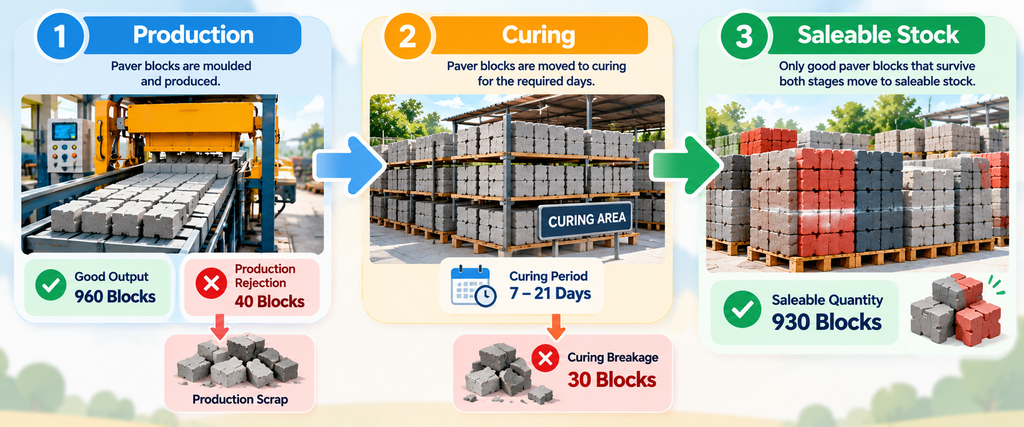
Production → Curing → Saleable Stock
with damage recorded at the stage where it occurred.
3. Track Damage by Batch
Tracking paver blocks by production batch makes the information much more useful.
The ERP can connect the damage to details such as:
- Production batch
- Product or variant
- Production date
- Machine or production line
- Quantity produced
- Production rejection
- Curing breakage
- Final saleable quantity
This allows management to compare production runs instead of looking only at a monthly scrap total.
4. Turn Wastage into Useful Production Data
Manufacturing wastage tracking should help answer practical questions.
Are certain products producing more rejection? Is one production line showing higher losses? Is curing damage increasing? Is a particular batch performing differently from normal?
With ERPNext, paver blocks can be tracked through these stages while the system preserves both the good quantity and the loss quantity.
This gives production and quality teams a reliable starting point for investigation.
5. Connect Damage with Product Costing
Damage also affects manufacturing cost. Raw materials, labour, machine time, and other production expenses have already been consumed before a damaged piece is identified.
If 1,000 units are produced and only 930 become saleable after production and curing losses, the cost impact should not disappear into a month-end stock adjustment.
For manufacturers producing paver blocks, accurate damage records can therefore support better inventory valuation, production analysis, and product costing.
Why This Matters for ERP in Coimbatore and Tamil Nadu Manufacturers
Businesses searching for ERP in Coimbatore often need more than standard accounting and inventory screens. Manufacturing operations require workflows that reflect what actually happens on the factory floor.
For paver manufacturers, an ERPNext implementation in Coimbatore can connect production, curing, stock, quality, sales, and costing in one process.
Similarly, businesses evaluating ERP in Tamilnadu can use ERPNext to create industry-focused workflows instead of maintaining separate registers and spreadsheets.
For growing manufacturers, ERPNext in Coimbatore can provide a central view of production and inventory, while ERPNext in Tamilnadu can support businesses that need scalable manufacturing and stock control across locations.
Thirvusoft focuses on practical ERP implementation, helping manufacturers design workflows around their real operating process rather than forcing the business into a generic system.
Avoid Using Stock Adjustment as the Normal Process
Stock adjustment is useful for correcting genuine errors. It should not become the regular method for recording predictable production loss.
When paver blocks are damaged during production or curing, the loss should be recorded at the point where it is identified. This creates a stronger audit trail and gives management better data for wastage analysis.
This approach is particularly valuable for companies comparing ERP in Coimbatore providers because the quality of implementation matters as much as the software itself.
What the Connected ERP Workflow Looks Like
Production records total output and immediate rejection.
Good material moves to curing.
Curing completion records additional breakage.
Only the surviving quantity moves to saleable stock.
ERP reports production rejection and curing breakage separately.
Management can then review damage by product, batch, machine, period, or other relevant operational dimensions.
Benefits
✓ Production rejection and curing breakage are clearly separated.
✓ Saleable stock reflects the quantity that actually survives the process.
✓ Damage remains connected to the relevant production batch.
✓ Manufacturing wastage becomes measurable instead of hidden.
✓ Production and quality teams can identify recurring loss patterns.
✓ Product costing becomes more realistic.
✓ ERPNext provides one connected source for production and inventory information.
Frequently Asked Questions
Should production and curing damage use the same scrap location?
They may use the same physical damage area, but the transaction should identify the stage where the damage occurred.
Can ERPNext track curing breakage separately?
Yes. A suitable ERPNext workflow can record curing-stage damage before the surviving quantity is transferred to saleable stock.
Why track damage by batch?
Batch-level tracking helps connect the loss to a specific production run, making investigation and comparison easier.
Does damage tracking help with costing?
Yes. Recording actual losses gives the business better information about the quantity available for sale and the cost associated with production.
Build a Better Paver Manufacturing Workflow with ERPNext
The goal of ERP is not to add more data entry. It is to make important operational information visible at the right time.
When paver blocks are tracked from production through curing and into saleable stock, managers can see where material is being lost, why it may be happening, and how it affects inventory and cost.
For businesses looking for ERPNext in Coimbatore or ERPNext in Tamilnadu, Thirvu Soft can help design a practical manufacturing workflow around production, inventory, quality, and costing requirements.
Record damage where it occurs so wastage becomes measurable instead of disappearing inside stock adjustments.
📞 Book Your FREE ERPNext Demo Today
Call / WhatsApp: +91 63790 44767
📍 Peelamedu, Coimbatore
No comments yet. Login to start a new discussion Start a new discussion