
Stop Double-Booking Your Rental Stock: Date-Based Reservation in ERPNext
Prevent double-booking of centering sheets, props and scaffolding with date-based rental stock reservation in ERPNext. See how future availability, returns and advance approvals can be managed in one
“We have 800 props in the yard.”
That sounds like enough stock.
But what if 300 props are already booked for one site next week and another 400 are reserved for a different project?
Suddenly, the question is not:
“How much stock do we have today?”
The real question is:
“How much stock can we actually promise for the customer's required dates?”
This is one of the biggest challenges in a construction-material rental business.
Centering sheets, shuttering plates, props, spans, jacks and scaffolding are not sold permanently. They move from one customer site to another and eventually return to the rental yard.
That means rental businesses need more than normal inventory management. They need date-based rental stock reservation in ERPNext.
For rental businesses looking for ERPNext in Coimbatore, ERP in Coimbatore, or an ERP solution across Tamil Nadu, this distinction is important. A system should not only tell you what is physically available today. It should help you understand what will be available on a particular future date.
Why Normal Stock Checks Fail for Rental Businesses
In a normal trading business, stock availability is relatively straightforward.
If you have 800 units and sell 200, you have 600 units remaining.
Rental works differently.
Consider this example:
- 800 props are currently available in the yard.
- 300 props are booked from the 12th to the 30th.
- 400 props are booked from the 20th to the 5th of the following month.
- 250 props are expected to return from another site on the 18th.
Now a customer asks:
“Can you give me 300 props from the 15th to the 25th?”
The answer cannot be calculated simply by looking at today's stock.
The business must consider:
- Existing reservations
- Reservation dates
- Expected returns
- Quantity already returned
- Branch or warehouse
- Customer approval status
- Requested rental period
This is why rental stock reservation in ERPNext needs to be based on dates, not only current stock.
How Date-Based Rental Reservation Works in ERPNext
A rental booking should represent a specific time period.
Instead of simply recording:
Props – 300 Nos
the booking should record:
Props – 300 Nos
From Date – 12 October
To Date – 30 October
This gives the ERP enough information to determine whether the stock is available for another customer during the same period.
For businesses implementing ERPNext in Coimbatore or elsewhere in Tamil Nadu, this type of customization can make the standard sales process much more suitable for rental operations.
1. Every Rental Booking Carries a Date Range
The Sales Order becomes more than a sales document.
It becomes the customer's rental booking.
Each rental item can have:
- Item
- Quantity
- From Date
- To Date
- Branch
- Warehouse
- Customer
- Project or Site
- Advance amount
- Booking status
For example:
| ItemQuantityFromTo | |||
| Centering Sheet | 500 | 12 Oct | 30 Oct |
| Props | 300 | 15 Oct | 25 Oct |
| Scaffolding Frame | 200 | 20 Oct | 10 Nov |
This makes the rental period visible from the beginning.
A properly configured ERP for rental business can then use these dates when calculating future availability.
2. ERPNext Checks Overlapping Rental Dates
This is where date-based rental stock reservation in ERPNext becomes valuable.
When a new rental booking is entered, the system checks existing approved bookings for the same item and warehouse.
For example:
Existing booking:
12 Oct → 30 Oct
New booking:
20 Oct → 25 Oct
These periods overlap.
Therefore, the quantity already reserved must be considered before confirming the new booking.
The system can identify overlapping bookings when:
- An existing booking starts before the requested period and ends after it.
- An existing booking starts within the requested period.
- An existing booking ends within the requested period.
Bookings that have already finished are not counted.
Bookings that start after the requested rental period are also not counted.
This gives the counter team a much more realistic view of future stock availability.
3. Returned Quantity Should Become Available Again
Rental stock does not remain with the customer forever.
Suppose:
- 500 props were rented.
- 200 props are returned on 18 October.
- The original rental continues for the remaining 300.
Those 200 returned props should no longer remain blocked for the customer.
The reservation calculation should therefore consider actual returns.
This is important because otherwise rental companies may keep stock unnecessarily reserved even after it has physically returned to the yard.
A well-designed ERPNext rental management system can connect reservation data with return transactions so available stock is updated more accurately.
4. Only Confirmed Bookings Should Block Stock
Not every enquiry should reserve your rental inventory.
Imagine a customer calls and says:
“I may need 300 props next month.”
Should those 300 props immediately become unavailable?
No.
A rental business needs a clear booking workflow.
For example:
Draft
The counter records the customer's requirement.
Advance Payment Received
The customer pays the required advance.
Approved
The authorized person confirms the booking.
Only confirmed bookings should block rental stock.
This prevents uncertain enquiries from unnecessarily reducing availability.
It also gives branch managers better control over high-value or overdue customers.
5. Advance Payment Can Protect the Reservation
Rental businesses often use advance payments before releasing material.
The reservation workflow can therefore connect:
Customer Booking → Advance Payment → Approval → Stock Reservation
The Sales Order can show:
- Customer outstanding
- Advance received
- Requested rental period
- Reserved quantity
- Available quantity
- Branch stock
This gives the person taking the booking the information needed to make a decision without checking multiple screens.
For an ERP in Coimbatore or an ERP in Tamil Nadu designed around a rental workflow, this kind of connected information can significantly reduce manual checking.
6. Rental Kits Need Reservation Too
Some rental products are supplied as complete sets.
For example:
Prop Kit
- Prop
- Base plate
- Head plate
Or:
Scaffolding Set
- Frames
- Couplers
- Jacks
- Accessories
If only the main item is reserved, the business may accidentally promise a complete set when some components are already committed to another customer.
Therefore, grouping or kit components should follow the same rental date range.
When the main item is reserved, the required components should also be considered.
This creates a more reliable construction material rental ERP workflow.
7. The Rental Counter Gets Live Availability
The counter employee should not have to call the warehouse every time a customer asks:
“Can you give me 300 props from next Monday?”
The Sales Order can show the relevant information directly:
- Current branch stock
- Existing reservations
- Requested quantity
- Expected returns
- Available quantity
- Customer outstanding
- Advance received
- Booking status
For example:
| ItemYard StockReservedExpected ReturnAvailableRequested | |||||
| Props | 800 | 500 | 200 | 500 | 300 |
| Centering Sheet | 1,200 | 700 | 100 | 600 | 400 |
| Scaffolding Frame | 450 | 200 | 50 | 300 | 200 |
If the requested quantity exceeds future availability, the system can clearly warn the user before the booking is confirmed.
8. Prevent the Same Rental Stock From Being Promised Twice
This is the main business benefit of date-based rental stock reservation in ERPNext.
Without date-based reservation:
Customer A: 300 props
Customer B: 400 props
Customer C: 300 props
The system may show enough physical stock today.
But all three customers may require the same stock during the same week.
With date-based reservation, the ERP considers the rental period before confirming the booking.
This protects the business from:
- Double-booking
- Last-minute stock shortages
- Customer disputes
- Emergency transfers between branches
- Unplanned purchases or cross-hiring
- Manual availability calculations
9. Site and Branch Should Be Part of the Reservation
Rental businesses often operate multiple branches.
The same item may be available at:
- Coimbatore Branch
- Tiruppur Branch
- Erode Branch
- Chennai Branch
Availability should therefore be evaluated against the relevant warehouse or branch.
This becomes especially important when rental stock moves between customer sites.
With ERPNext in Coimbatore, businesses can design rental workflows around their actual branches, warehouses and customer sites instead of maintaining separate spreadsheets for each location.
For businesses operating across Tamil Nadu, an ERP in Tamil Nadu can provide a common structure while still maintaining branch-level stock visibility.
10. CRM and Rental Booking Can Work Together
Rental enquiries usually begin before the booking.
A customer may first contact the sales team asking:
“Do you have 500 centering sheets available for next month?”
That enquiry can begin in CRM.
The workflow can then move from:
Lead → Customer Enquiry → Quotation → Rental Booking → Advance → Approval → Delivery
This is where CRM in Coimbatore and CRM in Tamil Nadu can complement an ERPNext rental workflow.
The CRM manages the customer relationship and enquiry.
ERPNext manages the actual:
- Rental booking
- Stock reservation
- Delivery
- Return
- Billing
- Payment
When CRM and ERP processes are connected, the sales team does not have to maintain one customer conversation in CRM and a completely separate rental process in spreadsheets.
The Complete Date-Based Rental Workflow
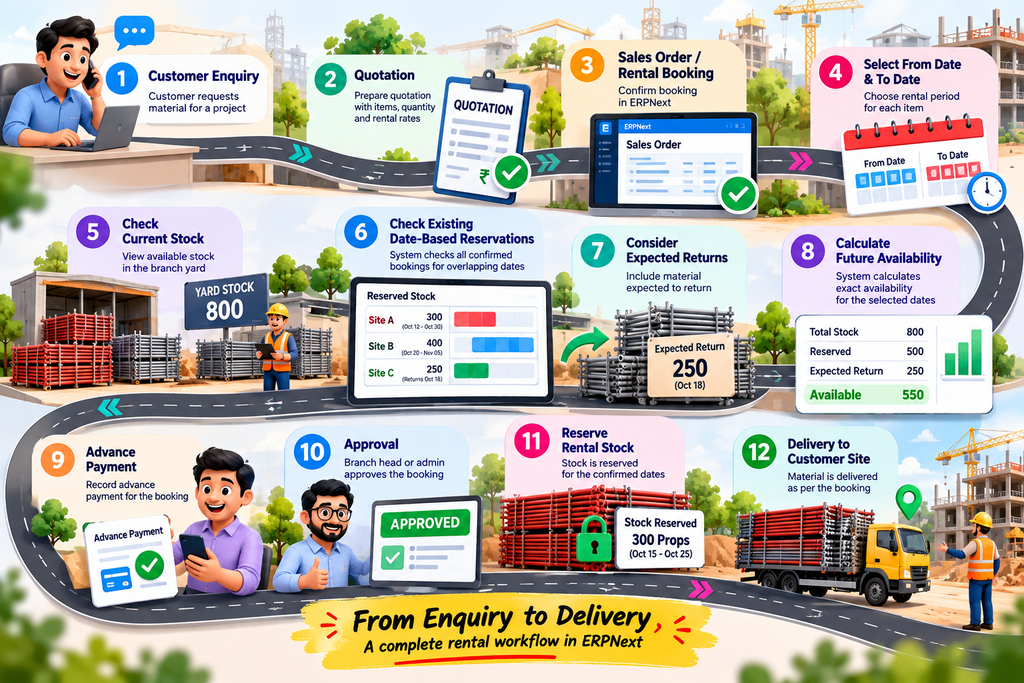
A connected rental process can look like this:
Customer Enquiry
↓
Quotation
↓
Sales Order / Rental Booking
↓
Select From Date & To Date
↓
Check Current Stock
↓
Check Existing Date-Based Reservations
↓
Consider Expected Returns
↓
Calculate Future Availability
↓
Advance Payment
↓
Approval
↓
Reserve Rental Stock
↓
Delivery to Customer Site
This workflow creates a clear connection between the customer's requirement and the physical rental stock.
What Happens When Stock Is Not Available?
The system should not simply say:
“Stock unavailable.”
A better rental system should help the user understand why.
For example:
Requested: 500 Props
Available for Period: 320
Shortage: 180
The counter can then make an informed decision.
Possible actions may include:
- Offer a different delivery date
- Check another branch
- Reduce the quantity
- Wait for expected returns
- Arrange additional rental stock
- Cross-hire from a supplier
This changes the ERP from a simple record-keeping system into a practical decision-support tool.
What Changes for the Rental Business?
A properly implemented ERPNext rental management system can provide several operational benefits.
No Double-Booking
The system checks future reservations before confirming a rental.
Faster Customer Responses
The counter can check availability for a specific date range without calling multiple departments.
Better Stock Utilisation
Material returning during the month can become available for future bookings.
Fewer Customer Disputes
Confirmed customers receive material based on an approved booking.
Better Branch Visibility
Management can understand stock availability by branch and warehouse.
Better Planning
Future rental commitments become visible before dispatch day.
Less Spreadsheet Dependency
Reservation information remains connected to the actual ERP transactions.
Why Date-Based Reservation Is the Foundation of Rental ERP
Rental businesses do not operate only with physical stock.
They operate with time-bound stock.
A prop sitting in your yard today may already be committed for next week.
A centering sheet returning on the 18th may be available for another project on the 20th.
A scaffolding frame reserved until the end of the month cannot simply be treated as free stock.
That is why date-based rental stock reservation in ERPNext is one of the most important foundations for a construction-material rental business.
Whether you are evaluating ERPNext in Coimbatore, ERP in Coimbatore, ERPNext in Tamil Nadu, or an ERP in Tamil Nadu, the key question is not simply:
“Does the system show stock?”
Ask instead:
“Can the system tell me what stock I can actually promise for a specific future date?”
Frequently Asked Questions
Can ERPNext handle date-based rental stock reservation?
Yes. With the appropriate rental workflow and customization, ERPNext can use rental start and end dates to calculate reservations and future availability.
Can partially returned rental material become available again?
Yes. The rental workflow can account for returned quantities so that available stock is updated based on actual returns.
Should every enquiry reserve rental stock?
No. Only confirmed bookings should normally block stock. A workflow can use advance payment and approval before making a reservation active.
Can different branches have separate rental stock?
Yes. Rental stock can be managed through branch-specific warehouses and availability calculations.
Can centering sheets and scaffolding be managed together?
Yes. Different rental items can have their own pricing, rental periods, grouping rules and reservation requirements within the same ERP workflow.
Can CRM be connected with rental operations?
Yes. CRM in Coimbatore or CRM in Tamil Nadu can manage enquiries and customer follow-ups, while ERPNext can manage the booking, stock, delivery, return and billing process.
Is this useful for businesses outside Coimbatore?
Yes. A properly designed rental ERP workflow can support businesses across Tamil Nadu and other locations, with branch, warehouse and site-level controls.
Build Rental Management Around the Way Your Business Actually Works
A rental business should not depend on a supervisor remembering which customer has which material.
It should not depend on a notebook to calculate future availability.
And it should not depend on a phone call between the sales counter and warehouse every time a customer asks for material.
With the right ERPNext rental management workflow, your business can connect:
Customer Enquiry → Booking → Date-Based Reservation → Advance → Approval → Delivery → Return → Billing → Payment
That is the difference between knowing what you have today and knowing what you can confidently promise tomorrow.
If you are looking for ERPNext in Coimbatore, ERP in Coimbatore, ERPNext in Tamil Nadu, or a connected ERP in Tamil Nadu for construction-material rental operations, Thirvusoft can build the workflow around your actual rental process.
Stop double-booking your rental stock. Make availability date-based, visible and reliable with ERPNext.
Book a demo with Thirvusoft and see how date-based rental stock reservation can work for your business.
📞 Book Your FREE ERPNext Demo Today
Call / WhatsApp: +91 63790 44767
📍 Peelamedu, Coimbatore
No comments yet. Login to start a new discussion Start a new discussion