
Missing Clamps, Bent Sheets: Managing Lost and Damaged Rental Material in ERPNext
Track missing and damaged rental materials, assign responsibility, update stock and generate recovery charges automatically with ERPNext rental management software.
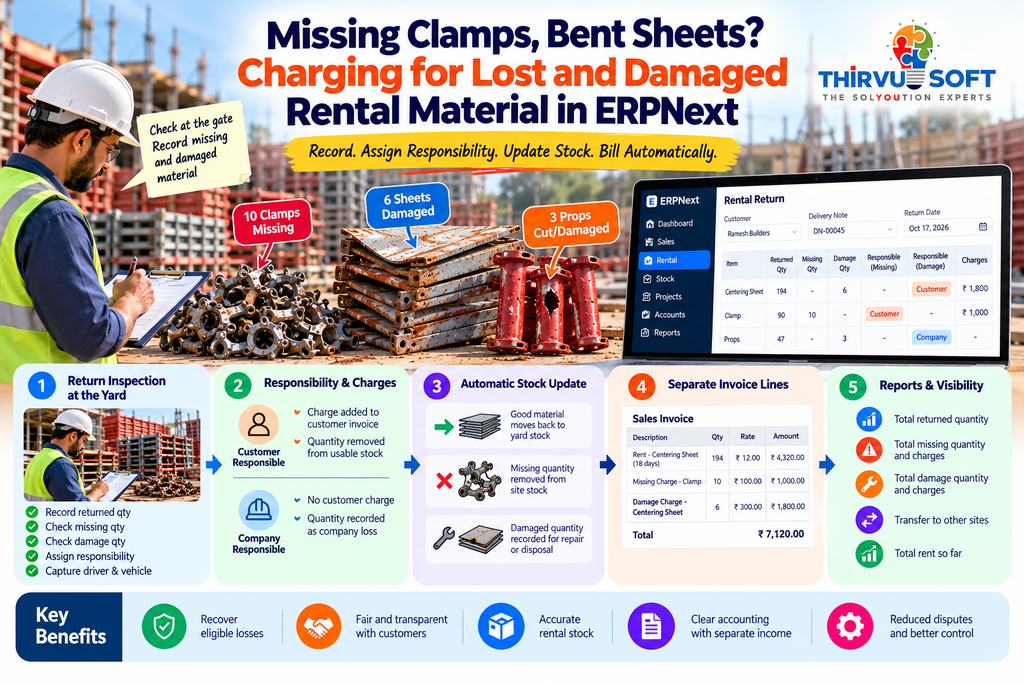 In a construction rental business, material does not always come back in the same condition in which it left the yard.
A customer may return most of the material but report that 10 clamps are missing, 6 centering sheets are damaged, or 3 props are no longer usable.
If these details are written in a notebook and entered into accounts weeks later, the business can lose track of both the material and the money.
his is where ERPNext rental management software can make a practical difference.
With the right rental workflow, missing and damaged material can be recorded during the return process, responsibility can be assigned, stock can be updated and eligible charges can flow into the customer's invoice.
For rental businesses looking for ERPNext in Coimbatore, ERP in Coimbatore, or an ERP solution in Tamil Nadu, this type of connected rental workflow can eliminate several manual reconciliation steps.
Why Missing and Damaged Rental Material Becomes a Problem
Rental businesses manage physical assets that move continuously between the yard and customer sites.
Centering sheets, props, spans, clamps and scaffolding may remain at a construction site for weeks or months.
During that period, several things can happen:
- Material may be lost at the site.
- Sheets may return damaged.
- Props may be modified or cut.
- Components may get mixed with another supplier's material.
- Some quantities may be transferred directly to another site.
- Returned quantities may not match the original delivery.
When these changes are not recorded properly, the system may show stock that is physically unavailable.
The result can be incorrect stock figures, missed recovery charges and unnecessary disputes with customers.
A rental inventory management system should therefore track not only what was delivered, but also what actually came back.
Record the Condition of Rental Material at Return
The best time to identify missing or damaged material is when the vehicle reaches the rental yard.
In an ERPNext rental software workflow, the return can be recorded against the original Delivery Note.
Each return line can capture:
- Returned quantity
- Missing quantity
- Damage quantity
- Missing responsibility
- Damage responsibility
- Missing charge
- Damage charge
- Vehicle
- Driver
- Return date
The yard supervisor can complete the inspection while unloading the material.
This creates a clear connection between the original delivery and the actual condition of the rental material when it returns.
Customer Responsibility and Company Responsibility
Not every damaged item should automatically be charged to the customer.
For example, material could be damaged:
- At the customer's construction site
- During loading
- During unloading
- While being transported by the company's vehicle
- Due to handling by company workers
That is why responsibility should be recorded separately.
Customer Responsible
When the customer is responsible for the missing or damaged material, the applicable recovery charge can be added to the customer's invoice.
Company Responsible
When the company is responsible, the customer is not charged.
However, the stock and loss should still be recorded correctly in the ERP.
This approach keeps the process fair while maintaining accurate rental inventory records.
Missing and Damage Charges Should Be Separate
A rental invoice should clearly explain what the customer is being charged for.
Instead of combining everything into one amount, the system can create separate invoice lines such as:
Rental Charge
Centering Sheet rental for the applicable period.
Missing Charge
Missing Charge for Clamp – 10 Qty
Damage Charge
Damage Charge for Centering Sheet – 6 Qty
This makes the invoice easier for the customer to understand and gives the accounts team a clear audit trail.
For a business using ERP in Coimbatore or ERP in Tamil Nadu, separating rental income from recovery income can also make financial reporting easier to analyse.
Keep Rental Stock Accurate After Every Return
Recording damage is not only about billing.
It also affects stock.
When good material comes back, the system can move it from the customer site warehouse back to the branch rental yard.
When material is missing, the missing quantity can be removed from the site stock through the corresponding stock transaction.
Damaged material can remain identified for inspection, repair or further disposition before it is made available for another rental.
This creates a much more reliable picture of:
Yard Stock → Material at Customer Site → Returned Stock → Missing Stock → Damaged Stock
For a multi-branch rental company, this visibility becomes particularly important.
What Happens When a Return Is Cancelled?
A rental system should also handle corrections properly.
Suppose a return was entered incorrectly and later cancelled.
The related stock movements should not remain in the system as if the original return still existed.
A properly connected ERPNext rental management system can maintain references between the return and its stock transactions so that cancellation can reverse the related movements.
This prevents orphan stock entries and keeps the rental history consistent.
What About Material Returned in Excess?
Sometimes a customer returns more material than what was originally delivered.
This can happen when material from another supplier or another customer site gets mixed with the rental material.
The system should not automatically treat that quantity as a normal rental return.
Instead, it can:
- Mark the quantity as Returned Excess
- Ask for a remark
- Keep it outside rental billing
- Track the excess quantity separately
- Allow the yard team to investigate its source
This prevents incorrect rent calculation and keeps the customer's rental history clean.
See Rental Losses at a Glance
The Delivery Note can provide a running summary of the rental transaction.
Management can see:
- Total quantity returned
- Total missing quantity
- Missing recovery amount
- Total damaged quantity
- Damage recovery amount
- Quantity transferred to other sites
- Rental amount generated so far
Instead of checking multiple registers, the manager gets a single operational view.
This is one of the practical advantages of implementing ERPNext in Coimbatore for a rental business: operational records, inventory and accounts can work from the same transaction history.
From Rental Return to Invoice
A connected rental workflow can follow this sequence:
Customer Site
↓
Rental Material Returned
↓
Return Inspection
↓
Returned / Missing / Damaged Quantity
↓
Assign Responsibility
↓
Update Rental Stock
↓
Calculate Applicable Charges
↓
Generate Sales Invoice
↓
Update Accounts
The important point is that the billing process starts from the actual return information.
The accounts team does not have to reconstruct the entire transaction from handwritten notes.
How ERPNext Supports a Connected Rental Business
A construction rental business usually has several connected activities:
- Customer management
- Rental quotations
- Sales Orders and bookings
- Date-based stock reservation
- Delivery
- Site-wise inventory
- Rental returns
- Missing and damage tracking
- Rental billing
- Payment collection
- Customer communication
When these processes are connected, the business gets a single operational history.
This is also where CRM in Coimbatore and CRM in Tamil Nadu can complement ERP workflows. Customer details, enquiries, follow-ups and rental transactions can be connected so sales teams and rental operations work with consistent customer information.
The goal is not to use CRM and ERP as separate registers.
The goal is to connect the customer relationship with the rental transaction.
Why This Matters for Rental Businesses in Tamil Nadu
Construction rental businesses across Tamil Nadu often operate with multiple customer sites, vehicles, branches and material categories.
A manual system may work when the rental yard is small.
As the number of customers and rental assets increases, however, the business needs better control over:
Where is the material?
When was it delivered?
What came back?
What is missing?
What is damaged?
Who is responsible?
What should be charged?
Has the stock been updated?
Has the customer been billed?
An ERP in Tamil Nadu can bring these activities into one connected workflow.
For businesses evaluating ERPNext in Tamil Nadu, the rental process can also be customized around the company's actual billing, return, branch and stock rules.
Business Benefits of Connected Rental Return Management
1. Recover Eligible Losses
Missing and customer-responsible damaged material can be converted into clearly identified recovery charges.
2. Improve Stock Accuracy
The system reflects what was returned, what is missing and what is damaged.
3. Reduce Customer Disputes
Return quantity, damage quantity and responsibility are recorded instead of relying on memory.
4. Simplify Billing
Rental charges, missing charges and damage charges can flow into the invoice from the return process.
5. Improve Branch Visibility
Managers can review rental material and losses branch by branch.
6. Create Better Accountability
Every return has a source document, quantity and responsibility.
A Simple Example
Suppose a customer received rental material and later returned:
- 194 centering sheets
- 90 clamps
- 47 props
During inspection:
- 10 clamps are missing
- 6 sheets are damaged
- 3 props are damaged
The return record can capture these quantities separately.
If the customer is responsible for the clamps and sheets, the corresponding recovery charges can be added to the invoice.
If the company is responsible for the damaged props, the customer is not charged, while the internal stock and loss records remain accurate.
This is much easier to verify than trying to reconstruct the same information at the end of the month.
The Complete Rental Return Workflow in ERPNext
Delivery Note
Material leaves the branch yard.
↓
Customer Site
Material remains at the project location.
↓
Return
Customer sends material back.
↓
Inspection
Returned, missing and damaged quantities are recorded.
↓
Responsibility
Customer or company responsibility is assigned.
↓
Stock Update
Good, missing and damaged quantities are reflected appropriately.
↓
Rental Calculation
Applicable rental charges are calculated.
↓
Missing / Damage Recovery
Eligible charges are added separately.
↓
Sales Invoice
Customer receives a clear invoice.
↓
Accounts & Reports
Rental income and recovery amounts become available for analysis.
Frequently Asked Questions
Can ERPNext track missing rental material?
Yes. A customized rental workflow can record missing quantities during the return process and link them to the original delivery.
Can damaged rental material be charged to the customer?
Yes, when the business determines that the customer is responsible. The charge can be generated separately from the normal rental amount.
What if the company caused the damage?
The customer need not be charged. The damage can still be recorded so the company's stock and internal loss records remain accurate.
Can missing and damage charges appear separately on the invoice?
Yes. The rental invoice can show separate lines for rental charges, missing material recovery and damage recovery.
Can ERPNext manage centering sheet and scaffolding rentals?
Yes. With the appropriate rental customization, ERPNext can support centering sheets, props, clamps, scaffolding and other construction rental materials.
Can this work for multiple branches?
Yes. Branch-wise yards, warehouses, rental transactions and reports can be connected within the ERP design.
Can CRM be connected with rental management?
Yes. CRM in Coimbatore or CRM in Tamil Nadu can be connected with ERP workflows so enquiries, customer information, follow-ups and rental transactions are easier to manage together.
Build Rental Management Around Your Actual Business Process
A rental business does not lose money only when material disappears.
It can also lose money when missing material is not recorded, damage is not assigned correctly, stock is inaccurate or recovery charges are forgotten.
The right ERPNext rental management software connects the physical movement of rental material with billing, inventory and accounting.
From the rental yard to the customer site and back again, every movement should tell the same story.
Delivered → Used → Returned → Inspected → Accounted → Billed
For businesses searching for ERPNext in Coimbatore, ERP in Coimbatore, ERPNext in Tamil Nadu or ERP in Tamil Nadu, this type of rental workflow can be built around the way your yard actually operates.
And when customer management is also connected, CRM in Coimbatore and CRM in Tamil Nadu can become part of the same business process rather than another isolated system.
Track every rental return. Record every loss. Keep stock accurate. Bill what is actually recoverable.
📞 Book Your FREE ERPNext Demo Today
Call / WhatsApp: +91 63790 44767
📍 Peelamedu, Coimbatore
No comments yet. Login to start a new discussion Start a new discussion