
What Does One Paver Delivery Trip Really Cost? Vehicle, Fuel & Loadmen Costing in ERP
Track vehicle, fuel, driver, distance and loadmen costs for every paver delivery with ERPNext, connecting transport expenses to customer sites and job costing.
A paver delivery is more than a truck leaving the factory.
There is a vehicle cost, driver cost, fuel expense, loading charges, unloading effort, distance and delivery time behind every trip. When these expenses are recorded only as monthly transport costs, it becomes difficult to understand the actual cost of serving each customer.
For paver manufacturers, a delivery trip costing ERP workflow can connect the delivery, vehicle, fuel and labour expenses to the customer site.
With ERPNext, this information can be connected to sales, stock, accounts and job costing. For businesses looking for ERP in Coimbatore or ERPNext in Coimbatore, this type of practical workflow is often more valuable than simply adding another accounting report.
Start With the Delivery Details You Already Have
The Delivery Note is the natural starting point.
A paver manufacturer already knows which customer is receiving the material, which vehicle is being used and what quantity is being dispatched.
The delivery record can capture:
- Vehicle
- Driver
- Delivery site
- Dispatch time
- Arrival time
- Odometer reading
- Loadmen
- Delivered quantity
- Related Sales Order or Site Work
This creates a delivery vehicle log that can later support transport costing and operational analysis.
The objective is not to collect unnecessary information. Every field should help answer a business question.
Distance Should Be Connected to the Customer Site
A truck travelling 20 km and a truck travelling 150 km cannot have the same delivery cost.
When the starting and ending odometer readings are recorded, the system can calculate the trip distance.
For example:
Opening Odometer: 45,200 km
Closing Odometer: 45,320 km
Trip Distance: 120 km
That distance can be associated with the customer site or project.
Over several deliveries, management can understand how much transport effort a particular project is consuming.
This becomes especially important for paver supply-and-laying projects, where transportation can have a significant effect on the final job margin.
Fuel Is More Than a Monthly Expense
Fuel is often recorded only under a general expense account.
The accounts team may know that the company spent ₹2,00,000 on diesel during the month, but management may still not know:
Which vehicle consumed the most fuel?
Which routes are expensive?
Which customer projects require repeated trips?
A connected ERP process can maintain fuel purchases against the relevant vehicle.
This creates a useful fuel expense tracking history and gives the business better information for transport planning and vehicle cost analysis.
For companies evaluating ERP software in Coimbatore, this is a good example of how ERP can connect accounting data with actual operational activity.
Loading and Unloading Are Real Costs
Paver deliveries also involve people.
Loadmen may be paid per trip, per load or based on the quantity handled. If these charges are calculated separately in notebooks or spreadsheets, they can easily get disconnected from the delivery.
Recording loadmen charges against the delivery makes the cost traceable.
For example:
Vehicle Cost: ₹1,200
Fuel Cost: ₹2,800
Driver Cost: ₹600
Loadmen Charges: ₹900
Total Delivery Cost: ₹5,500
Now the business can see what that particular trip actually cost instead of treating transportation as one large monthly overhead.
Why Monthly Transport Cost Is Not Enough
Suppose two customers each purchase 10,000 sq ft of pavers.
Customer A is 15 km from the factory.
Customer B is 120 km away and requires three separate trips.
The sales value may look similar, but the cost of serving the two customers can be very different.
Without site-level transport information, that difference can remain hidden.
With transport cost tracking, management can review:
- Number of trips
- Distance travelled
- Fuel consumed
- Driver cost
- Loadmen charges
- Vehicle cost
- Site-related transport expenses
This information can then be considered when reviewing job costing and project profitability.
Connect Delivery Cost With Paver Site Work
For supply-and-laying businesses, the delivery should not exist as an isolated transaction.
A connected workflow can look like:
Sales Order → Site Work → Delivery → Vehicle & Fuel Cost → Laying Progress → Returns → Billing → Job Cost
Now the business can connect physical delivery with the project that required it.
If a particular paver site requires five deliveries instead of three, the additional transport cost becomes visible.
This gives management a better understanding of the actual cost of completing the project.
ERPNext Can Be Customized Around the Delivery Process
Every paver manufacturer may handle transportation differently.
One company may calculate fuel based on kilometres. Another may maintain fixed vehicle charges. Another may calculate loadmen wages based on quantity or trip.
This is where ERPNext customization can be useful.
Instead of forcing the business to change its process completely, the ERP workflow can be designed around the existing delivery operation.
Custom fields, calculations, vehicle records, delivery cost logic and reports can be connected to the relevant ERP transactions.
This is one of the practical reasons businesses consider ERPNext in Coimbatore and ERPNext in Tamil Nadu for industry-specific ERP implementation.
Delivery Data Can Improve Future Planning
The value of delivery trip costing is not limited to accounting.
After enough trips are recorded, management can identify patterns such as:
- Frequently used long-distance routes
- Vehicles with higher operating costs
- Sites requiring repeated deliveries
- High-fuel-consumption vehicles
- Sites with slow unloading
- Delivery routes with higher labour costs
This information can help dispatch teams plan better.
It can also help sales teams understand the cost implications before quoting for distant projects.
What Management Should Be Able to See
A good delivery trip costing ERP workflow should make a simple question easy to answer:
“How much did it actually cost us to deliver this order?”
Management should be able to see the relationship between:
Customer → Site → Delivery → Vehicle → Distance → Fuel → Labour → Total Transport Cost
That turns delivery data into business information.
What This Looks Like in a Connected ERP Workflow
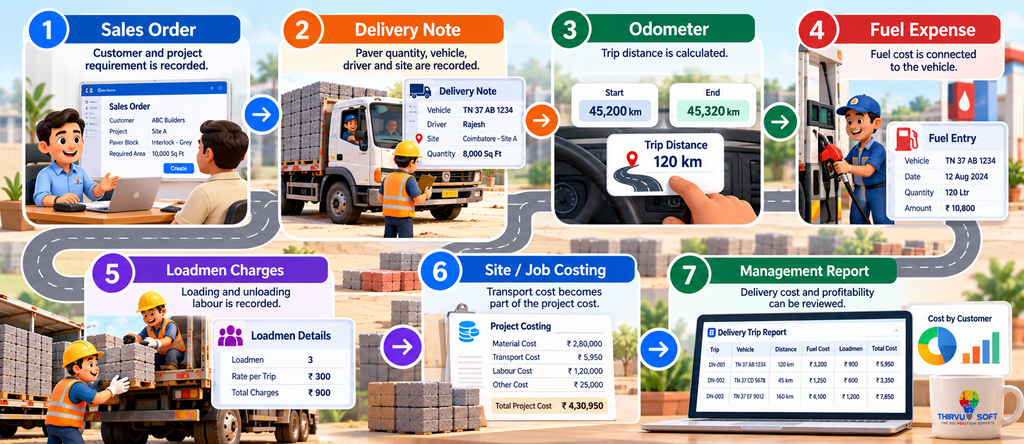
Sales Order
Customer and project requirement is recorded.
↓
Delivery Note
Paver quantity, vehicle, driver and site are recorded.
↓
Odometer
Trip distance is calculated.
↓
Fuel Expense
Fuel cost is connected to the vehicle.
↓
Loadmen Charges
Loading and unloading labour is recorded.
↓
Site / Job Costing
Transport cost becomes part of the project cost.
↓
Management Report
Delivery cost and profitability can be reviewed.
Frequently Asked Questions
Do we need GPS tracking for delivery costing?
No. GPS can provide additional information, but useful delivery costing can begin with vehicle details, odometer readings, delivery records, fuel expenses and transaction data.
Can fuel expenses be linked to a vehicle?
Yes. A suitable ERPNext configuration or customization can connect fuel purchases with the relevant vehicle and maintain its cost history.
Why should loadmen charges be recorded against delivery?
It connects the labour expense to the actual delivery activity instead of leaving it as an unrelated expense.
Can delivery cost be linked to a paver project?
Yes. When the delivery is connected to the relevant Site Work, Project or Sales Order, transport costs can be reviewed as part of the overall job cost.
Is this useful for paver manufacturers?
Yes. Paver manufacturers handling multiple customer sites, long-distance deliveries or supply-and-laying projects can benefit from tracking delivery costs at the transaction or project level.
Build ERP Around the Way Your Business Delivers
The real value of ERP is not simply recording that a truck left the factory.
It is understanding what was delivered, where it went, which vehicle carried it, how much fuel was used, how much labour was involved and what the delivery actually cost.
For businesses searching for ERP in Coimbatore, ERPNext in Coimbatore, ERP in Tamil Nadu or ERPNext in Tamil Nadu, these industry-specific workflows show how ERP can connect daily operations with financial decisions.
With the right ERPNext customization, delivery, stock, accounts and job costing can work together instead of remaining in separate spreadsheets.
Turn every delivery from an overhead estimate into a traceable job cost.
📞 Book Your FREE ERPNext Demo Today
Call / WhatsApp: +91 63790 44767
📍 Peelamedu, Coimbatore
No comments yet. Login to start a new discussion Start a new discussion