
Paver Site Material Reconciliation: Delivered vs Laid vs Returned
Track paver blocks from order to delivery, laying, returns and billing with ERPNext. Reconcile site quantities and improve stock, project and billing visibility.
Delivered 10,000 Sq Ft. How Much Was Actually Laid? Site Material Reconciliation for Paver Projects
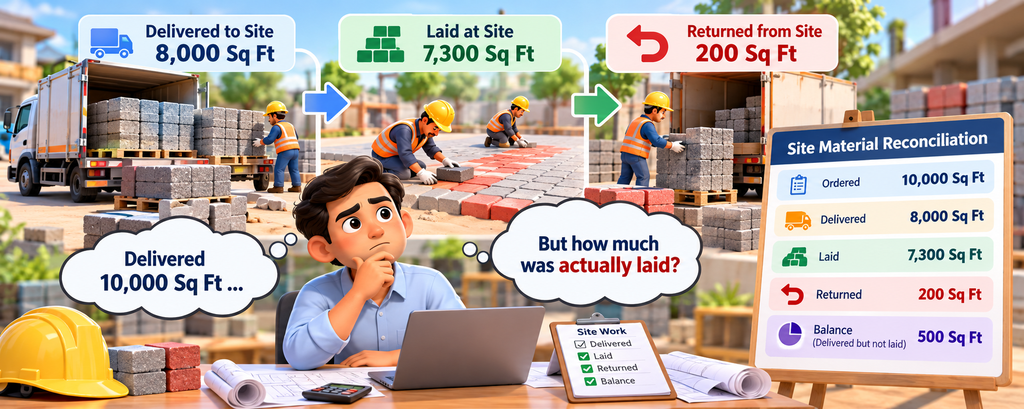
A paver order is not complete just because the paver blocks have left the warehouse.
In a supply-and-laying project, the business needs to know how much material was ordered, how much was delivered, how much was actually laid and how much came back from the site.
For example, if 10,000 sq ft of paver blocks were ordered and 8,000 sq ft was delivered, that does not mean 8,000 sq ft was consumed. Some material may still be at the site, some may have been returned, and only a portion may have been laid.
This is where paver site material reconciliation becomes important.
With a connected ERP or ERPNext system, sales, delivery, site execution, stock and billing can work from the same quantity information instead of separate spreadsheets.
Three Quantities Tell the Real Paver Site Story
For every supply-and-laying project, at least three quantities should be tracked:
- Delivered Quantity – Paver blocks physically delivered to the site
- Laid Quantity – Paver blocks actually installed or completed
- Returned Quantity – Paver blocks brought back from the site
These numbers are related, but they are not always the same.
If a business treats delivered quantity as laid quantity, it can create incorrect project progress, stock balances and billing information.
A good paver project management workflow keeps these quantities connected from the beginning.
How to Calculate Paver Blocks for a Site
One common question during paver projects is how to calculate paver blocks required for a particular area.
The calculation normally depends on:
- Site area in square feet
- Paver block size
- Number of paver blocks required per square foot
- Packing or bundle quantity
- Wastage or additional requirement
For example, if a particular paver block requires 4 pieces per square foot and the customer needs 10,000 sq ft:
Required Paver Blocks = 10,000 × 4 = 40,000 pieces
If those paver blocks are packed in bundles of 100 pieces:
Required Bundles = 40,000 ÷ 100 = 400 bundles
The exact conversion depends on the product specification.
Instead of asking employees to calculate these values manually for every order, the paver manufacturing ERP can maintain the conversion at the item level.
This makes how to calculate paver blocks much easier when the same products are ordered repeatedly.
Use the Site Record as the Reconciliation Point
A Site Work or Project record can become the central point for the entire paver project.
It can hold:
- Customer
- Project/site
- Required area
- Paver block type
- Size and colour
- Ordered quantity
- Delivered quantity
- Laid quantity
- Returned quantity
- Remaining quantity
- Responsible salesperson
- Delivery details
- Billing reference
When a Delivery Note is submitted, the delivered quantity can update the site record.
When the laying team records progress, the laid quantity can be updated against the same project.
If paver blocks are returned, the returned quantity can also be recorded against the site.
This creates one connected quantity view instead of separate registers.
Why Billing Should Know What Happened at the Site
- A Sales Order tells the business what was agreed with the customer.
- A Delivery Note tells the business what physically left the warehouse.
- But neither automatically tells the business how much work was completed at the site.
- For supply-and-laying projects, billing teams may need to understand the relationship between:
- Ordered → Delivered → Laid → Returned → Balance
- This does not mean every business must invoice only the laid quantity. Commercial terms may differ.
- The important point is that the ERP should provide the information needed to make the correct billing decision.
A Simple Paver Reconciliation Example
Suppose a customer orders:
10,000 sq ft of paver blocks
The business delivers:
8,000 sq ft
The site team lays:
7,300 sq ft
Later, the customer changes part of the site requirement and:
200 sq ft is returned
Now the business can clearly see that:
- Ordered: 10,000 sq ft
- Delivered: 8,000 sq ft
- Laid: 7,300 sq ft
- Returned: 200 sq ft
- Remaining delivered but not laid: 500 sq ft
This is much more useful than simply seeing "8,000 sq ft delivered."
The same information can be used by sales, dispatch, site supervisors, accounts and management.
Paver Returns Should Not Disappear From the Project
Paver blocks returned from a site affect both stock and project progress.
When material comes back:
- Stock should increase correctly.
- The returned quantity should be recorded against the site.
- The delivered balance should be updated.
- The remaining project requirement should remain accurate.
- Billing should have visibility of the return.
Without this connection, the warehouse may show the correct stock while the project still appears fully supplied.
Paver return tracking therefore needs to be part of the project workflow rather than a separate spreadsheet.
Why Manual Paver Calculations Create Problems
Many paver businesses still calculate quantities using spreadsheets, calculators and WhatsApp messages.
One person calculates pieces.
Another calculates bundles.
The site team records square feet.
The warehouse records dispatch quantities.
Accounts works from the Sales Order.
When these calculations are not connected, small differences can quickly become large reconciliation problems.
This is where ERPNext for paver manufacturers can provide a common data structure for sales, stock, delivery and project execution.
Track Paver Progress, Not Just Paver Delivery
Management should be able to answer simple questions without calling multiple people:
- How many paver blocks were ordered?
- How many were delivered?
- How many were actually laid?
- How many were returned?
- How much material is still at the site?
- Which sites are waiting for another delivery?
- Which sites have material delivered but little laying progress?
- Which projects have frequent returns?
- Which projects are ready for billing?
A connected paver site progress tracking system turns these questions into reportable information.
How ERPNext Can Connect the Paver Workflow
A practical ERPNext paver project workflow can look like this:
Sales Order
Customer requirement and agreed quantity are recorded.
↓
Site Work / Project
The approved order becomes an execution reference.
↓
Delivery
Paver blocks delivered to the site are recorded.
↓
Laying Progress
Actual completed area is recorded against the project.
↓
Return
Unused or excess paver blocks returned from the site are recorded.
↓
Billing
Accounts can review execution information before completing billing.
↓
Project Costing
Material, transport, labour and other project costs can be reviewed against the job.
This gives the business a complete path from paver sales to site execution.
ERP in Coimbatore for Paver Manufacturing
For growing paver manufacturers, implementing an ERP in Coimbatore is not simply about replacing spreadsheets.
The ERP should reflect the actual way the paver business operates.
A standard system may provide sales, stock, accounting and manufacturing features, but paver manufacturers may require additional workflows for:
- Paver block quantity calculation
- Sq ft to piece conversion
- Bundle tracking
- Site work
- Laying progress
- Paver returns
- Delivery reconciliation
- Site-level costing
This is where customizations in ERP can make the system fit the actual business process instead of forcing employees to change their working method.
ERPNext in Coimbatore and Tamil Nadu
Businesses looking for ERPNext in Coimbatore often need more than a basic ERP implementation.
For paver and concrete product manufacturers, the system may need to connect manufacturing, inventory, sales, delivery, project management and accounting.
An ERPNext in Tamil Nadu implementation can be designed around the company's actual product measurements, paver block sizes, packing methods, delivery process and site operations.
Similarly, businesses looking for ERP in Tamil Nadu can use industry-specific ERP workflows to reduce manual calculations and improve visibility across departments.
The objective is simple: one reliable quantity across the business, even when different teams work in different units.
What This Looks Like in a Connected ERP Workflow
Customer requirement
↓
Required paver area calculated
↓
Paver blocks and bundle quantity calculated
↓
Sales Order created
↓
Site Work created
↓
Paver blocks delivered
↓
Laying progress recorded
↓
Returns recorded
↓
Remaining quantity calculated
↓
Billing and project costing reviewed
This creates a clear connection between the customer's requirement and the actual site execution.
Frequently Asked Questions
Is delivered quantity the same as paver consumption?
No. Paver blocks delivered to the site may still be waiting to be laid, may be returned, or may be unused because of a site change.
How do you calculate paver blocks required for a project?
The calculation depends on the site area, paver block dimensions and the number of pieces required per square foot. ERP can maintain these item-level conversion factors to reduce manual calculation.
Can paver blocks be tracked in pieces and square feet?
Yes. A suitable ERP workflow can connect commercial quantities such as square feet with stock quantities such as pieces and bundles.
Can paver returns be tracked?
Yes. Returned paver blocks can be recorded against the site and reflected back into stock while maintaining the project's delivered and returned quantities.
Can ERPNext be customized for paver manufacturers?
Yes. ERPNext customization can be used when the standard workflow does not fully support requirements such as site reconciliation, laying progress, paver conversions, bundle calculations or return tracking.
Build the Workflow Around How Your Paver Business Actually Works
The value of an ERP is not in adding more screens. It is in connecting the operational steps that already happen every day.
For a paver manufacturer, that means connecting:
Sales → Paver Calculation → Stock → Delivery → Site Work → Laying → Returns → Billing → Costing
With the right ERPNext implementation and customizations in ERP, your team can move away from separate spreadsheets and manual paver calculations.
Whether you are evaluating ERP in Coimbatore, ERPNext in Coimbatore, ERP in Tamil Nadu or ERPNext in Tamil Nadu, the important question is not simply which ERP should we buy?
The better question is:
Can the ERP accurately connect what we sold, what we delivered, what we laid and what came back?
Bring paver delivery, laying progress, returns and billing into one connected ERP workflow with Thirvusoft.
📞 Book Your FREE ERPNext Demo Today
Call / WhatsApp: +91 63790 44767
📍 Peelamedu, Coimbatore
No comments yet. Login to start a new discussion Start a new discussion