
Paver Curing Stock Tracking in ERPNext: Keep Uncured Blocks Out of Saleable Stock
Track paver curing batches, curing time, damage and saleable stock in ERPNext to prevent uncured blocks from appearing as available inventory.
Are Uncured Paver Blocks Showing as Available Stock?
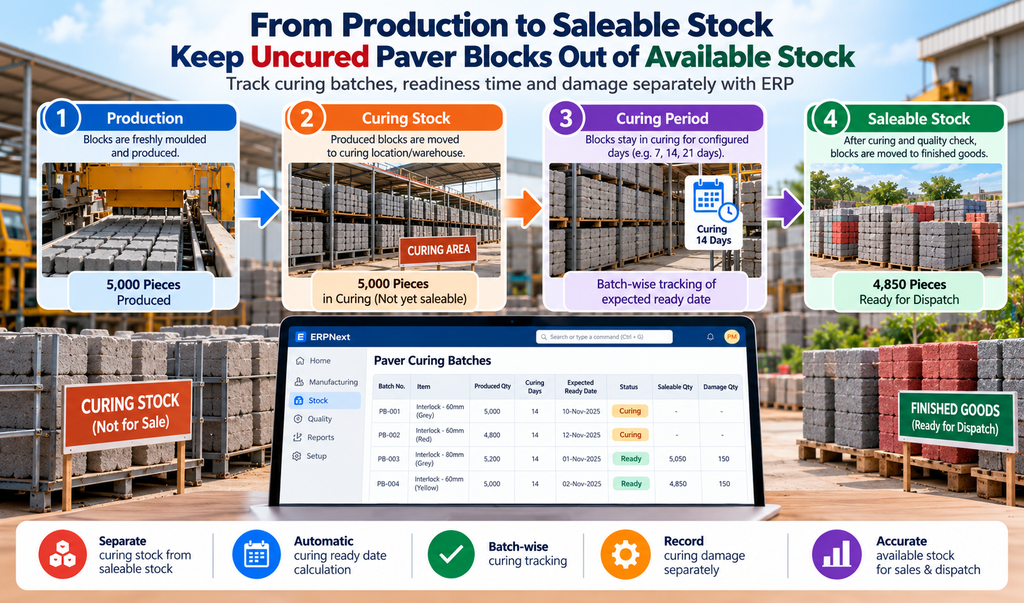
In paver manufacturing, production quantity is not the same as saleable stock.
A batch may be produced today, but the paver blocks may still require several days of curing before they can be handled, dispatched and sold.
If your ERP records freshly produced blocks directly as finished goods, the sales team may see stock that is physically unavailable for dispatch.
This is where paver curing stock tracking becomes important.
With the right ERPNext manufacturing and inventory workflow, manufacturers can separate produced stock, curing stock, damaged stock and saleable finished goods.
The Stock Gap Between Production and Saleable Inventory
Immediately after production, the factory knows how many paver blocks were manufactured.
But that quantity does not automatically mean the blocks are ready for customers.
A typical paver manufacturing process may look like:
Production → Curing → Quality Check → Saleable Stock → Dispatch
When curing is not represented in the inventory process, all produced quantities may appear as available finished goods.
This can create problems such as:
- Sales promising stock that is still curing
- Incorrect available-stock reports
- Last-minute dispatch delays
- Manual calls between sales and stores
- Difficulty identifying ready and unready batches
A dedicated curing stock stage solves this gap.
Track Paver Curing by Batch
Batch-wise tracking makes paver curing management much easier.
When a production batch is created, the system can record:
- Production date
- Paver item
- Batch number
- Production quantity
- Curing duration
- Expected ready date
- Curing location
- Damaged quantity
- Saleable quantity
- Curing status
For example, if a paver requires 14 days of curing, the system can calculate the expected ready date automatically.
The production team can then immediately identify:
Still Curing → Ready for Inspection → Ready for Dispatch
Instead of depending on handwritten registers or employee memory.
Keep Curing Stock Separate from Saleable Stock
One of the most important controls in paver inventory management is separating curing stock from finished goods.
A practical ERPNext workflow can use different inventory stages:
Curing Warehouse
Freshly produced blocks waiting for the required curing period.
Damage / Rejection Location
Blocks damaged during curing or inspection.
Finished Goods / Saleable Warehouse
Blocks that have completed curing and are ready for customer dispatch.
This makes the meaning of available stock much clearer.
When sales checks inventory, the quantity represents stock that can actually be dispatched—not freshly produced blocks still waiting for curing.
Automatic Curing Readiness
Manual curing calculations become difficult when production happens every day and multiple paver varieties are manufactured.
An ERP-based curing batch tracking system can calculate the expected readiness date from the production date and required curing duration.
The curing dashboard can show:
| StatusExample | |
| Still Curing | 18 Batches |
| Ready Today | 7 Batches |
| Ready for Dispatch | 12 Batches |
| Curing Damage | 3 Batches |
This gives production, stores and sales teams a common view of inventory readiness.
Record Curing Damage Separately
Not every produced paver becomes saleable.
Some blocks may be damaged during handling, curing or quality inspection.
If this loss is simply adjusted from stock later, management may not know when or where the loss occurred.
A better workflow records:
Produced Quantity → Curing Quantity → Damage Quantity → Saleable Quantity
For example:
5,000 Produced
− 150 Damaged
= 4,850 Saleable
This gives the business a much clearer picture of actual production yield.
Why This Matters for Paver Manufacturers
Without proper paver stock management, production, sales and stores may all work with different numbers.
Production sees what was manufactured.
Stores sees what is physically available.
Sales sees what the ERP reports as available.
If these numbers are not connected, customer commitments become difficult to manage.
With ERPNext for paver manufacturing, the same inventory flow can connect production, curing, stock, sales and dispatch.
This is particularly useful for growing manufacturers managing multiple products, colours, sizes, batches and warehouses.
What Management Can See
A connected paver manufacturing ERP should help management answer simple questions quickly:
- How many pavers were produced today?
- How many are still curing?
- Which batches become ready today?
- How much saleable stock is available?
- How much was damaged during curing?
- Which products have higher curing losses?
- How much stock is currently blocked in curing?
Instead of checking multiple registers, spreadsheets and WhatsApp messages, the information can come from one system.
The Connected ERPNext Workflow
Production Batch
↓
Curing Warehouse
↓
Automatic Curing Period
↓
Quality / Damage Check
↓
Saleable Finished Goods
↓
Sales & Dispatch
This creates a simple and traceable paver curing stock tracking process.
Frequently Asked Questions
Do we need a separate warehouse for curing?
A separate curing warehouse or inventory location is a practical way to prevent uncured pavers from being treated as saleable finished goods.
Can ERPNext calculate the curing ready date?
Yes. The workflow can calculate the expected ready date based on the production date and the configured curing duration.
Can curing damage be tracked separately?
Yes. Damaged quantities can be moved to a separate location or recorded separately so that saleable stock remains accurate.
Can sales see only dispatchable stock?
Yes. The inventory workflow can distinguish curing stock from finished saleable stock, giving sales a more reliable available-stock figure.
Build a Better Paver Inventory Workflow with ERPNext
The purpose of ERP is not simply to record production. It should represent how the factory actually works.
For paver manufacturers, curing is a real operational stage between production and sale.
By implementing paver curing stock tracking in ERPNext, manufacturers can control curing batches, improve finished goods inventory accuracy, track damage and give sales teams a more reliable view of dispatchable stock.
For businesses looking for ERPNext in Coimbatore, or an industry-focused ERP in Coimbatore and Tamil Nadu, Thirvusoft can customise the workflow around your actual production and inventory process.
Separate produced stock from saleable stock with batch-wise curing control inside ERPNext.
Thirvusoft — ERPNext implementation and custom ERP solutions for manufacturers.
📞 Book Your FREE ERPNext Demo Today
Call / WhatsApp: +91 63790 44767
📍 Peelamedu, Coimbatore
No comments yet. Login to start a new discussion Start a new discussion